OpenAI Dots vs. Meta Muse: Everything You Need to Know
Imagine having an AI assistant that continues working even after you close your laptop. It checks your projects, handles routine tasks, and reminds you about important things while you're busy with the rest of your day.
OpenAI Dots and Meta Muse are bringing that experience to life.
Both are persistent cloud-based AI agents designed to complete tasks and work in the background. They can use connected apps, browse websites, and keep track of ongoing goals.
So why are two major technology companies offering seemingly similar products?
The answer becomes interesting once you look at how people are expected to use them.
OpenAI Dots leans toward professional work and complex projects. Meta Muse puts greater emphasis on everyday personal assistance and easy access.
Let's explore their differences and find out which one makes sense for you.
What Is OpenAI Dots?
OpenAI introduced Dots on September 29, 2026.
Powered by GPT-6 Astra, Dots is designed to handle ongoing responsibilities through its own cloud computer.
You can assign a project and let your agent work through the necessary tasks. It can research information, create documents, review code, and keep track of project developments.
Dots also connects to more than 4,000 applications through OpenAI's plugin ecosystem.
Imagine you're running a small business.
Your Dot could help prepare weekly reports and follow customer requests. It could also review project updates and prepare materials for upcoming meetings.
You can communicate with it through ChatGPT, Slack, or Microsoft Teams.
OpenAI's approach is especially appealing to professionals who want AI assistance throughout their workday.
What Is Meta Muse?
Meta launched Muse on September 8, 2026, a few weeks ahead of OpenAI Dots.
Muse is a personal AI agent powered by Meta's Muse Spark model.
Like Dots, it runs on a persistent cloud computer. Its environment is called Muse Secure VM.
Muse can browse websites and connect to supported applications. It can also help with shopping, reservations, reminders, and personal projects.
Imagine you're planning a weekend trip.
Muse could research hotels and compare travel options. It could also help arrange reservations after receiving the necessary approvals.
Another appealing feature is its connection to WhatsApp.
You can communicate with Muse through an app you may already use throughout the day.
Meta wants its AI agent to feel approachable and useful for ordinary daily activities.
OpenAI Dots vs. Meta Muse: Key Differences
Both agents share a similar technical idea, yet their priorities differ.
Here's a quick comparison.
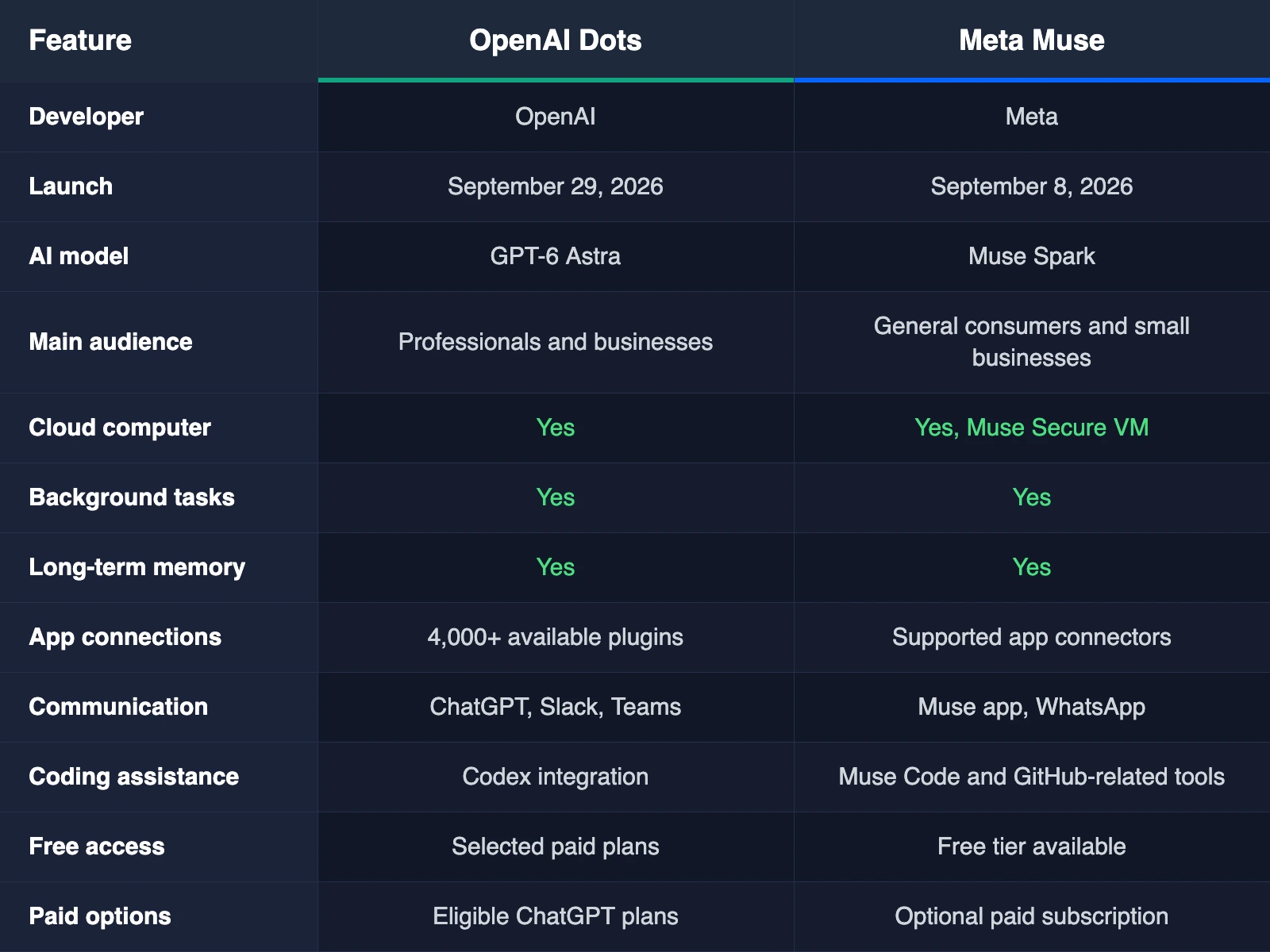
The biggest difference involves how the two companies approach the user experience.
Which AI Agent Is Better for Work?
OpenAI Dots has a particularly strong appeal for professional tasks.
Its connections to ChatGPT Work and Codex allow it to assist with research and software development.
A developer might assign a Dot to investigate a software issue and prepare suggested fixes.
Someone managing a product launch could ask the agent to update documents when project requirements change.
Dots can maintain context between tasks and continue working toward established goals.
Meta Muse also offers business capabilities.
Its growing app ecosystem includes services such as QuickBooks, Asana, and GitHub. Small businesses can use Muse for research and project planning.
The practical difference comes down to your existing workflow.
If your daily work already involves ChatGPT and Microsoft Teams, Dots may feel like a natural choice.
If you prefer WhatsApp and Meta's services, Muse may be easier to use on a regular basis.
Which One Is Better for Everyday Life?
Meta Muse has an appealing advantage for personal activities.
You can ask it to monitor prices and manage reminders. It can also research restaurants and help with travel arrangements.
Imagine finding a pair of headphones you like.
Muse could monitor the price and alert you when a worthwhile offer appears.
You could also ask it to prepare a daily briefing about your calendar and upcoming activities.
Dots offers personal assistance as well.
You can assign it recurring responsibilities and ask it to monitor information from connected applications.
However, Muse's messaging experience and free entry point make it especially approachable for people exploring personal AI agents for the first time.
How Do Their Background Tasks Compare?
Persistent operation is one of the most interesting features shared by Dots and Muse.
Both agents can continue working after you close their apps.
OpenAI Dots can manage ongoing projects and revisit relevant information as work progresses.
Its proactive research feature examines information through permitted read-only connections.
For example, your Dot could notice developments affecting an existing project and prepare an update.
Meta Muse also keeps working in the background.
You could ask it to monitor weather reports and alert you when rain is expected.
Muse can track goals and suggest useful activities based on your preferences.
Both products aim to reduce repetitive work.
Their actual performance will depend on the task, connected services, and available permissions.

Which AI Agent Has Better Memory?
Memory plays an important role in persistent AI agents.
Dots learns from previous conversations and feedback. It can become familiar with your preferences and professional responsibilities.
Imagine regularly asking your Dot to prepare project reports.
Over time, it can learn which information you prefer to include and how you like reports organized.
Muse also remembers relevant personal details and goals.
You might mention that a family member prefers vegetarian food.
Muse could use that information when helping you plan a future dinner.
The distinction is mainly about context.
Dots places considerable emphasis on work processes and project continuity.
Muse aims to understand personal preferences and everyday needs.
Both approaches can be useful depending on your priorities.

OpenAI Dots vs. Meta Muse: Privacy and Security
Giving an AI agent access to email and connected accounts requires trust.
OpenAI and Meta have introduced security measures intended to protect users.
Dots uses permission settings and action reviews to manage sensitive activities.
Users can inspect ongoing work and choose when an action requires approval.
OpenAI also applies specific data protection policies to business workspaces.
Muse uses a dedicated virtual computer and a separate security system called Sentinel.
The security system examines agent activity and helps manage potentially sensitive operations.
Muse also provides an activity history and approval settings.
Meta says Muse conversations are kept separate from its advertising systems.
Both companies recognize the importance of human oversight.
For activities involving payments and private information, reviewing permissions remains a sensible practice.

Which AI Agent Is Cheaper?
Pricing creates a meaningful difference between the two services.
Meta Muse offers a free tier with usage limits.
People who need additional capacity can choose a paid subscription.
The free option allows new users to explore AI automation in everyday activities.
OpenAI Dots is currently offered through selected ChatGPT subscriptions.
Eligible Pro and Business Premium customers receive their first Dot as part of their plan.
Enterprise organizations can access a beta version through administrator-enabled settings.
Dots is positioned toward customers who already invest in advanced AI services.
Muse is generally the more accessible starting point for casual users.
Subscription details and usage allowances can change as both products develop.

Can Dots and Muse Use Your Computer?
Both agents have persistent cloud computers with their own browsers.
Dots can also connect to additional devices when you grant permission.
Its desktop capabilities can help with work involving local applications and files.
Muse operates through its Secure VM environment.
Users can interact with the browser environment and intervene during tasks.
Muse also offers applications for mobile devices and Mac.
The right choice depends on which devices and applications you use most frequently.
Which AI Agent Is Better for Coding?
OpenAI Dots has strong capabilities for software development.
Its Codex integration supports tasks involving code changes and testing.
Developers can ask their Dot to investigate bugs and prepare updates for review.
Meta has its own development tools through Muse Code.
Muse Code supports complex programming projects and can coordinate background agents.
Both companies are investing in AI-assisted software engineering.
For developers already comfortable with OpenAI's coding tools, Dots may offer a familiar workflow.
People using Meta's developer ecosystem may prefer Muse Code.
Testing both products on a realistic programming task is a useful way to compare their results.

Can OpenAI Dots or Meta Muse Replace a Personal Assistant?
Both agents can handle activities associated with personal and administrative assistance.
They can research information and organize schedules. They can also prepare communications and monitor ongoing tasks.
Imagine you manage several meetings throughout the week.
An AI agent could help prepare meeting notes and identify relevant follow-up activities.
Human judgment remains valuable for sensitive decisions and important relationships.
An AI agent can support your work while you retain responsibility for its activities.
Which Should You Choose: OpenAI Dots or Meta Muse?
Your preferred agent depends on the responsibilities you want to assign.
Choose OpenAI Dots if:
You regularly manage professional projects.
You already use ChatGPT for advanced work.
You want close connections to Codex and Microsoft workplace tools.
You need help with reports and software development.
Choose Meta Muse if:
You want assistance with everyday personal activities.
You enjoy communicating through WhatsApp.
You want to explore AI agents through a free tier.
You regularly manage shopping and travel plans.
Both products can help with activities beyond these examples.
OpenAI Dots vs. Meta Muse
OpenAI Dots and Meta Muse offer two interesting approaches to persistent AI assistance.
Dots emphasizes professional productivity and continuing project responsibilities.
Muse emphasizes personal convenience and broad accessibility.
Both use cloud computers and connected applications to complete tasks over time.
The experience is becoming much closer to having a digital assistant who remembers your goals and helps carry out your plans.
For business users who already depend on ChatGPT, Dots is an appealing choice.
For people who want an accessible personal assistant for daily activities, Muse offers an attractive starting point.
The best choice comes down to your routine and the services you already enjoy using.
As both products develop, their competition could make useful AI automation available to an increasingly wide audience.
 Make your brand matter.